
When you try to send or to receive email in Microsoft Outlook, you may receive one of these errors like: 0x8004010F: Outlook data file cannot be accessed.
To solve Microsoft outlook problem, identify the current location of your default Outlook data file, and then create a new Outlook profile. Follow the given steps to create a new profile. If your outlook giving error 0x800ccc0f then to fix this error follow my blog-How to fix outlook express 0x800ccc0f error which i have discussed in same blog.
Step1: If you are using Windows XP, click Start-> Control Panel-> Mail
If you are using Windows Vista or Windows 7, click Windows icon(Start)-> Control Panel-> User Account and Family Safety-> Mail(If you are using 64 bit version of Windows, then look for Mail- 32 Bit icon).
Step2: Click on Show Profiles option.
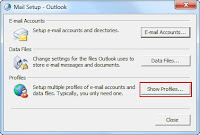 Step3: Click on Add. Type the name as NewOutlook and click Ok
Step4: You will get the option to setup a new email account
Step5: Configure your email account.
Step6: When completed, you will be back to Mail window
Step7: Select the option "Always use this profile" and from the dropdown box, select the profile NewOutlook
Step8: Click Apply and Ok and then Start Outlook and try to send/receive mails.
If you want to fix unknown error 0x8004060C in outlook then follow this article, How to Fix Unknown Error 0x8004060C in Microsoft Outlook.
To solve Microsoft outlook problem, identify the current location of your default Outlook data file, and then create a new Outlook profile. Follow the given steps to create a new profile. If your outlook giving error 0x800ccc0f then to fix this error follow my blog-How to fix outlook express 0x800ccc0f error which i have discussed in same blog.
Step1: If you are using Windows XP, click Start-> Control Panel-> Mail
If you are using Windows Vista or Windows 7, click Windows icon(Start)-> Control Panel-> User Account and Family Safety-> Mail(If you are using 64 bit version of Windows, then look for Mail- 32 Bit icon).
Step2: Click on Show Profiles option.
 Step3: Click on Add. Type the name as NewOutlook and click Ok
Step4: You will get the option to setup a new email account
Step5: Configure your email account.
Step6: When completed, you will be back to Mail window
Step7: Select the option "Always use this profile" and from the dropdown box, select the profile NewOutlook
Step8: Click Apply and Ok and then Start Outlook and try to send/receive mails.
If you want to fix unknown error 0x8004060C in outlook then follow this article, How to Fix Unknown Error 0x8004060C in Microsoft Outlook.
